I think it could be helpful to have a multi-select option for images within an item, so the user can submit several pages for transcription. If I’m not mistaken (which I could well be considering I’m far from tech-savvy) currently the option are either to select the entire item and transcribe, or select one image each time within the item. So in situation when we just need some parts of an item a multi-select option could be useful.
Totally agree, Maayan! This and other batch editing options are something that I have been thinking about. If you notice that a lack of any other such options (e.g, mass editing items, or moving several into lists at once) is impeding your workflow please let us know and we can prioritise appropriately.
1 Like
I second Maayan’s suggestion, I’ve really been missing an option to select multiple images to transcribe after I’ve already uploaded them
1 Like
We’ve just implemented this feature! See notes on Leo v0.1.6 here.
1 Like
On the same note of selecting multiple boxes, I also think that when selecting a box to select a document, the box is too small so that you can accidentally deselect everything if you do not click squarely in the middle of the box. If it was designed so that any part of the document selected on the far left of the label (to the left of the document), it would make the manual selection a lot easier and less time consuming for someone who is selecting many at one time but doesn’t necessarily want to “transcribe all”.
I was having exactly the same issue with selecting images yesterday and didn’t think of this fix. Have added it to our task list. Thanks very much Paul!
1 Like
Had another idea for a potential solution, on a computer in files you can scroll at the same time as selecting documents (speeding up the proccess), or holding shift and the arrow key and you are able to go through them and select them more quickly in this way also. Perhaps that could be another solution to the issue of multi select?
1 Like
Yes, we’re currently working on implementing shift multi-select. It should be coming very soon! 
1 Like
Hi Jon, just to come in on this. I really welcome the option to batch-select for transcription. I’m having some issues with this though as it seems to change how many images I can batch select at any one time, and if I select too many, it unselects them all, so I have to start again. But as I say, the amount of images I can select seems to change every time so it’s really hard to work to these restrictions. On top of that, it would be really helpful if the images automatically unselected after the transcription has been completed. At the moment they stay selected, so I then have to go back and unselect them all in order to start selecting a new batch. Thanks!
Hi Anna, I think the issue with images deselecting at apparently random intervals probably relates to the checkbox being quite small, and so easy to miss, as Paul mentions here:
As for automatically deselecting/ selecting all images, this should now be possible with the master/ bulk-selection checkbox, that appears as the first icon on the top-right of the images panel. If you press it once, it will select all items. Twice, and it will deselect all of them:
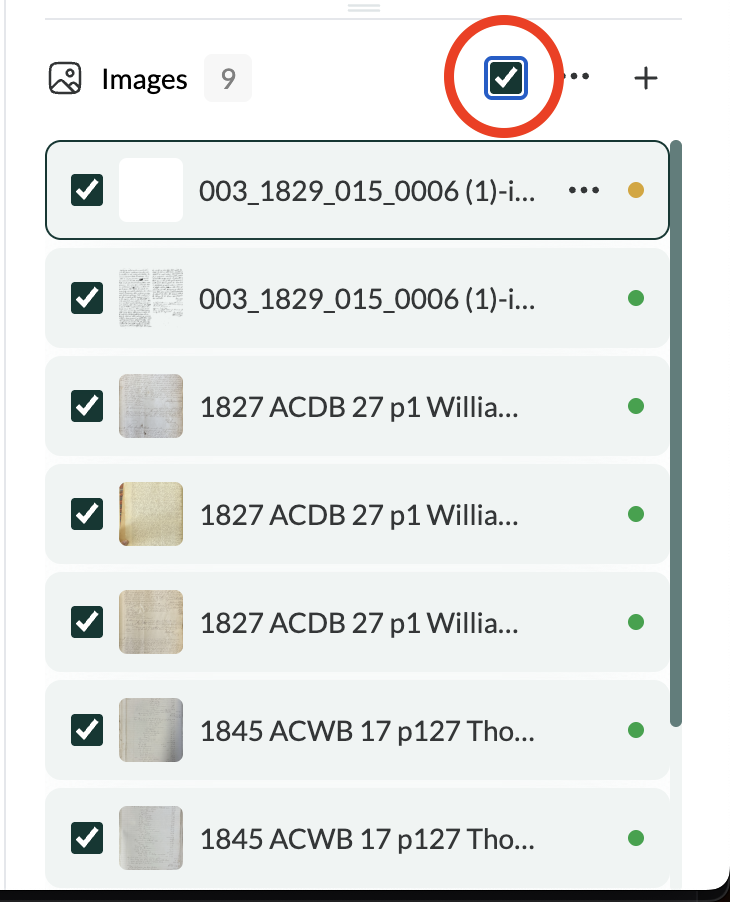
Hope this helps 
These features have been refined and should work seamlessly in the latest release (v.0.3.1).