Hello! So far, I find the transcription accuracy excellent. I have some issues with the interface that I do not find very user friendly (at least for older users like me). First of all, it would be useful to have an introduction on how to use Leo that explains how it works in details. For example, on some of my items in the list I see a square (looks like a page with a lifted upper right corner) between the three dots and the green bullet point, and I don’t have a clue of what that means.
Second, I would like a better feedback when I click action buttons like Save (maybe a color change, maybe a pop-up window confirming the saving): I am left with the doubt I really saved, and I find myself clicking multiple times to be sure.
Third, the light gray background that highlights the current item on the list is too pale to be evident, especially after long hours at the computer.
I will continue to add suggestions as I get more familiar with the app. Thank you!
Yes, absolutely, we also think that a tutorial for new users would be a good idea. We’ve been holding off as any guide would quickly become irrelevant as we continue to make major changes to the user interface (UI). The square with the raised upper corner are supposed to look like notepads or post-it notes. They just mean that there is an annotation associated with that item. The dot reflects the transcription status, either orange (Draft), green (Transcribed), or blue (Finalized).
It’s helpful to know that a save notification would be helpful. We can add a toast (this is what the little pop-ups at the bottom are called) when a transcription or note has been saved. And we will look into reviewing the color scheme. (Does the darker vertical line on the left edge of the highlighted list help at all?)
Thanks so much!
I am not sure if something changed since I started last week, initially I had trouble figuring out how to upload a PDF, so I converted a PDF into a set of photos and then uploaded them - their order was scrambled because Leo sorted the individual photos not according to how they were in the original PDF to folder of photos, but according to the order they were uploaded. When I tried transcribing individual pages the transcription would show up as complete, and then remain blank. I tried again with better internet and uploading a PDF, which Leo converted to invidial images, maintaining their original order. Here I used the automatic transcription function to have it work through all the images. This worked better and was smoother than trying to individually transcribe images.
Yes, it should work better now as we introduced PDF upload functionality a few days ago. 
Hi there, I’ve noticed in the last few days that there is no longer an option to automatically put in metadata (creatir, date created, etc.). It would be a small quality of life upgrade to bring this back!
I’ve noticed some instances where whilst uploading images for transcription from a list Leo has not automatically added the item to the list I am workinng through.
Ah, we never had this option. It probably has something to do with your browser settings.
Do you mean that you are currently viewing all items within that list, you press “New item” and the list doesn’t appear on the second step of the upload modal?
Hi Jon, no it’s more the case that whilst most of the time Leo automatically ticks the box for the list I am adding new items to it doesn’t always do this.
I’m not sure if this is the right thread for this but I’m wondering if there’s a way to rename upload titles - there is definitely a way to rename individual files but I can’t seem to rename the document as a whole - although lists help with this
I really like the export transcription function, but I don’t love the fact that it exports the transcript in the order you select the image. So if I select pages 1, 2, 4, 8, and 9 and then decide at the end that I also want to add page 3, it will either export 124893 or I have to re-enter my selection. It’s not a huge deal, but it would be annoying if I had to export part of a large document.
As an aside, law reviews might be a good client for an early rollout of this software; they often have to check the accuracy of sources and going through all the handwritten materials can be time consuming. I’m preparing an article for the editing process now and am planning to send them a transcript, which I think they will appreciate a lot.
Ah well spotted. This is a bug. I’ve noted it and we’ll fix it. Thank you for reporting 
Just a follow-up on the save notification: Transkribus has a visible tally of unsaved changes/edits to a transcription, and whilst I’m not sure an excat tally is all that helpful, having a visible note that you have ‘unsaved changes’ is a useful prompt to save regularly. Just a thought.
Leo should autosave changes to transcripts and notes instantaneously. The save button is really just a failsafe/ to allow users to be absolutely sure that their changes are not lost. But perhaps a little indicator that switches between “Unsaved changes” to “Saved” when the user has stopped typing or editing would be a more elegant solution.
Good things I like about the experience: 1) I found the upload system pretty easy to use. It would be nice if there was a note on the upload section on how many images or pages can be uploaded at once. 50MB is a little less user friendly than saying “70 pages can be uploaded at a time”. 2) The ability to export the transcripts as both pdf and word is very useful and I found the style of export in the word document good. Points of improvement: 1) only seeing 68 documents in the mass export button was a little confusing although everything exported when I hit the mass export button. 2) The search bar at the top wasn’t able to find my documents in the system when I typed in a simple matching word. For example I have several documents that are titled Merchant Maiden Hospital… when I searched “Merchant” nothing popped up.
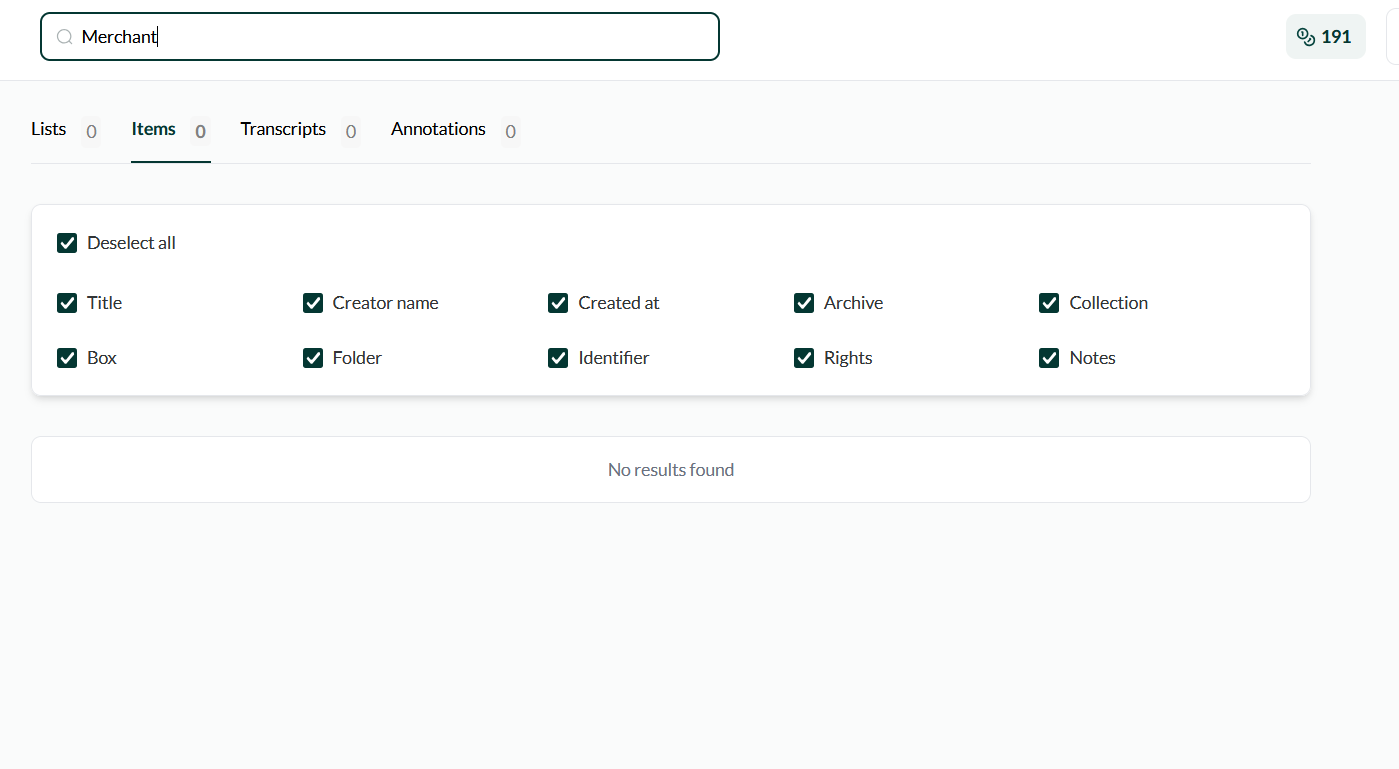
This is strange… I can’t immediately reproduce this on my end but we’ll look into it!
The tutorial with step-by-step instructions on how to use Leo did not appear for me util after I had uploaded and transcribed more than 400 images! It did not appear the first time I used Leo or any of the other times I was using it. I’m not sure what triggered it but it appeared too late to be useful. Helpful if user could initiate tutorials at any time. I think the tutorial is a new feature and that’s why it wasn’t available earlier. Great addition!
A sort button would be very useful. The images don’t always stay in the same order they were in when they were uploaded and the user can not sort the files by file name. Dragging the image to the desired position is clunky and you can only move one at a time. When I tried to move one image, three other images would revert back to their original locations. You end up having to move the same image multiple times. This task was very frustrating and time consuming.
Hi Jobie, yes, we only introduced the tour in the last release so that’s why you didn’t see it before. The user can initiate tours via Intercom (the orange circle in the bottom left).