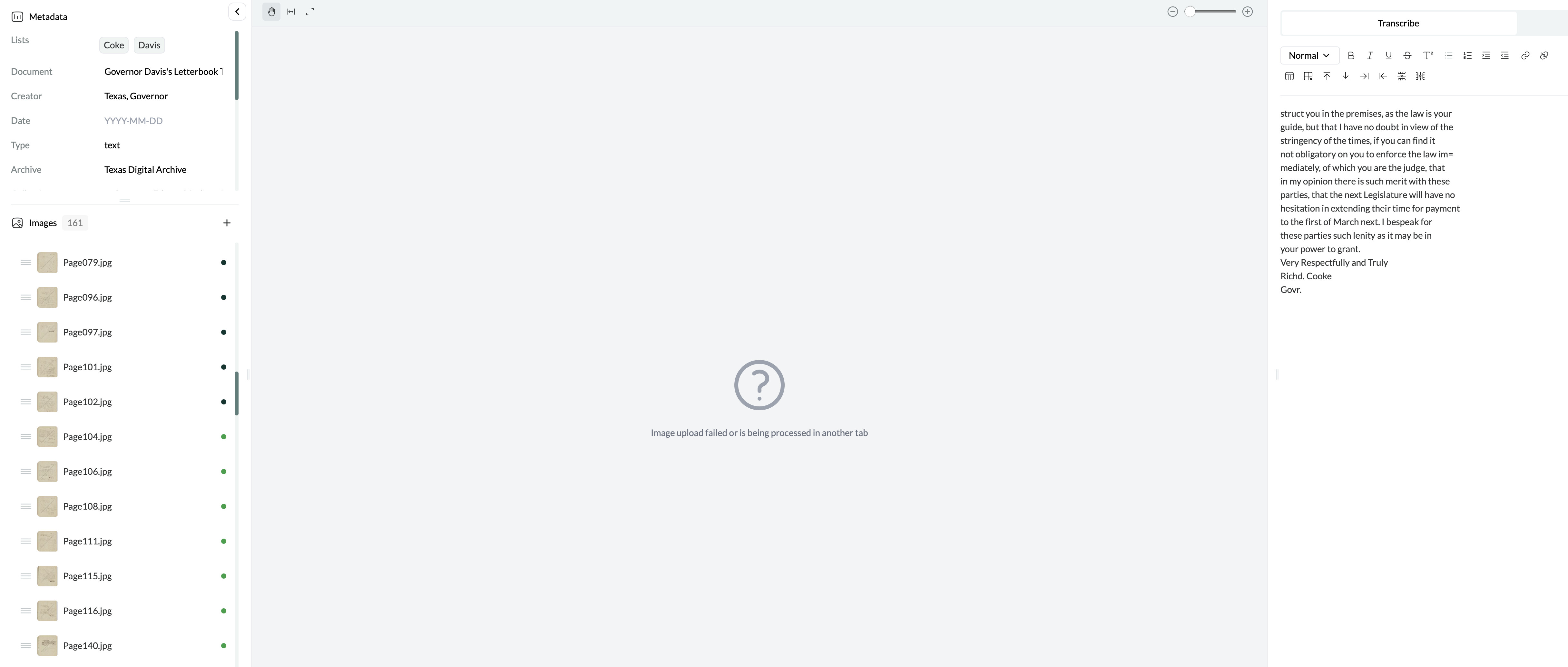
I use Leo to screen through archival documents to find those that connect to my research. I am uploading selected items in jpeg and I am erasing those not relevant to me. When I erase an item from the list, it disappears from the list as expected, but I can still see its transcription in full screen and Leo reports a blank page with the message “Image upload failed or is being processed in another tab.” This is confusing because for my logic, I would expect Leo to automatically shift to the following item or just report a blank page with no message and no transcription.
Hi Serena! I’m struggling to understand exactly what’s going on here. Could you give some more info, listing the steps to reproduce in as much detail as possible?
Sorry, it is difficult for me to explain myself at times! Look at the screenshot below: I just deleted item named “Page 112,” the image disappeared immediately, replaced by “Image upload failed… etc” and the transcription on the right is still visible. It would be great if after deleting item “Page 112,”, Leo jumps straight to next item instead (“Page 115” in this case). Hope it makes sense…
1 Like
Thanks Serena. I have reproduced this bug. We’ll get it fixed!
1 Like