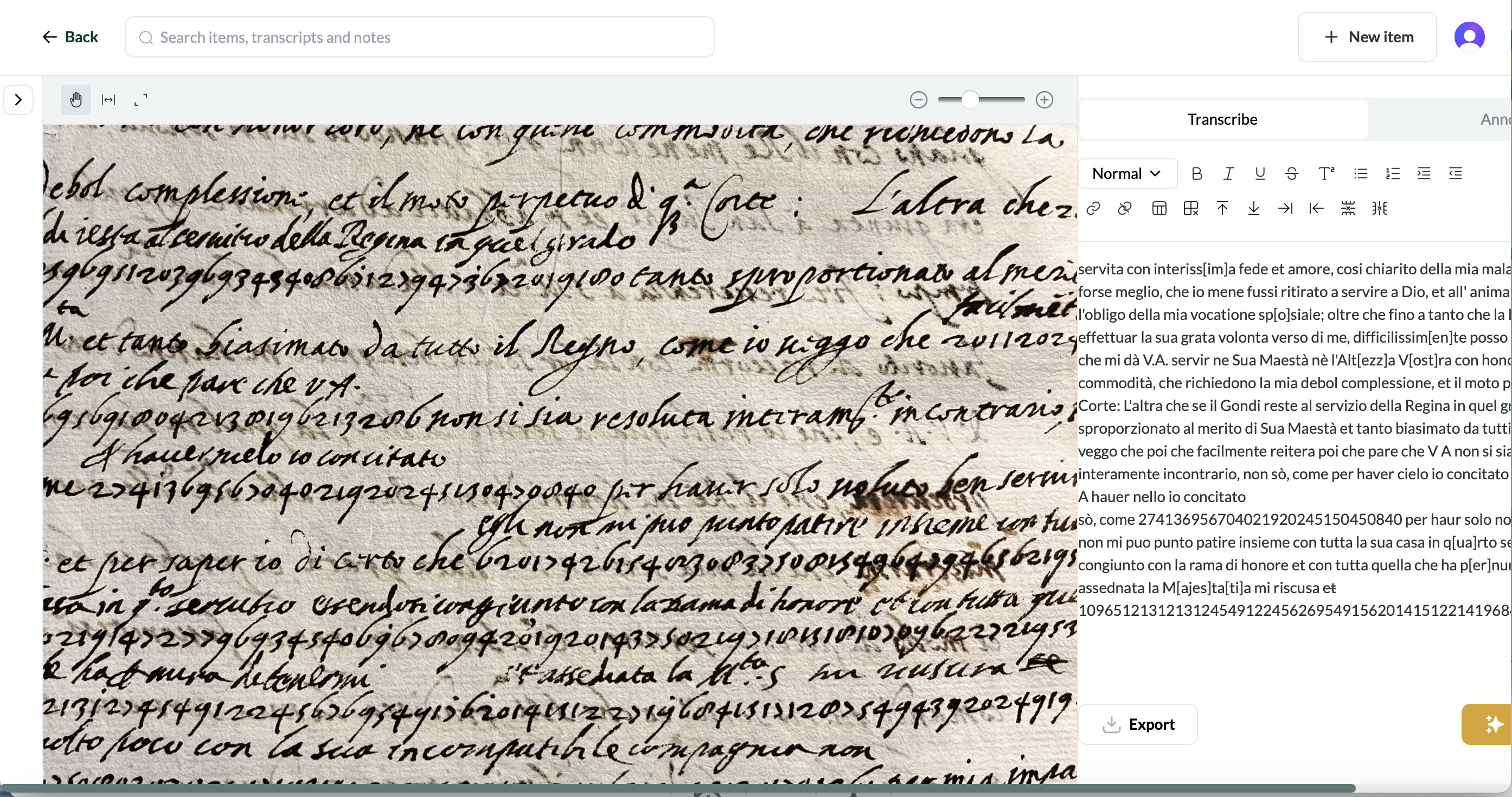
I don’t know the correct terminology, apologies if this doesn’t make sense.
I’m having trouble seeing everything at once: the width of the screen doesn’t allow for the transcription and image to be seen all at once, even with the side menu closed. I have to scroll across to access the right side of the transcription, and then back for the left side of the image, unless I keep it unzoomed in and on the right side of the image section. Making the window smaller or larger doesn’t change it, the size just scales equally. And the image zoom doesn’t make a difference.
See screenshot, note that the scroll bar isn’t all the way across, the margins on the transcription are cropped, and there is no ‘save’ key visible. The header bar adjusts appropriately to the screen size.
In case it matters, I’m using Safari on a MacBook.
Thank you for this Hanna! We’re working on some issues relating to smaller screen resolutions at the moment and your screenshot is helpful for alerting is to what some of the issues are. It’d be helpful to know what your screen resolution is. You can find this by following these steps:
Click on the Apple icon in the top-left corner of your screen,
Go to System Settings (or System Preferences)
Click Displays
Note the Resolution shown (e.g., 1920 x 1080)
To improve how Leo displays in the mean time, you might find that it’s helpful to try zooming out on Safari, either by:
Using keyboard shortcuts
Press command (⌘) and minus (–) key together to zoom out.
Press command (⌘) and plus (+) key to zoom in again if needed.
Return to default zoom level by pressing command (⌘) + 0.
Using the “View” menu
At the top of your screen, click View.
Select Zoom Out (or Zoom In).
Select Actual Size (or Zoom Reset) to return to the default level.
Thank you. It is set to default, 1440 x 990. When I change it to a larger resolution (1680 x 1050) it doesn’t change the problem.
Neither does zooming in the screen using the keyboard shortcuts. It just scales the screen, so I still can’t, for example, see the ‘save’ button.
I can sent a screen recording if that is helpful?
No worries—I have been able to reproduce the bug, which seems to relate to how the very long string of numbers in the transcript affects how the pane on the right displays. I’ll confer with Jack and we’ll try to get this fixed as soon as possible. Thank you!